Thursday, September 27, 2007

How to install Windows XP into Acer Aspire 4710 Notebook

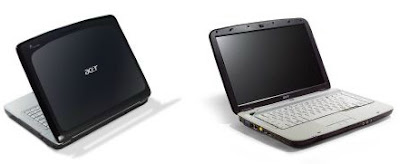
Acer has been launched a new model Acer Aspire 4710, this model specially designed for Windows Vista. But now most of the people interested to work in windows Xp because windows vista got enough problems. Because of this model designed for Windows vista, its bios’ setting is not compactable with windows Xp. If you try to install windows xp, error will occur saying that there is "NO HARDDISK" has been found in your system, this is happens because windows not able load the SATA drivers for the installation.
How to Resolve it??
To resolve this issue and to install the windows Xp into your Acer 4710 Laptop, you have to provide the SATA drivers during the installation, unfortunately laptop doesn't have floppy drive, So you may required to update your bios version. There is an ISO file which may help you to update your bios. Download this file and burn into CD using Nero Express. Choose the option that Burn from image. Start the laptop with burned CD, it will take you into bios updating wizard where it will update the bios automatically. After updating computer will restart. Press F2 and enter into bios settings. In Main menu you able to find the option called SATA Mode, by Default it is in ACHI Mode, select the SATA mode and press enter then choose the IDE mode.(See the picture below) Press F10 and save your bios setting. Now you can boot from Windows XP CD and it is ready to install the Windows XP into your Acer Aspire Notebook. Download the Windows Xp Drivers.

Labels: ,

 
posted by Joby on 6:39 PM | Permalink | 1 comments
Wednesday, April 11, 2007

Tips for Desktop Google Search

Desktop Google Search1. Launch Programs and Documents: If u have a program in your start menu, Google desktop would have already indexed it. Just start typing the name of the program and it'll show up in the pop up bar. Just scroll to it and hit enter to launch the programs or documents. If you have a lot of installed programs, this is the best and easier way to choose the programs.

2. An Address bar: If you want to access the file from Network, just type the address of your file path, Google desktop can open the File.

3. File Recovery: If you mistakenly deleted a file, you able to recover from the Google Desktop Cache. You can type the file name and it will be there from the last index history.

4.Web pages Access Offline: All web pages that you make a visit are stored in the cache on your computer regardless of Internet Settings. These cached pages you can access even when you are offline.
5. Quick Search Button: You can hit Ctrl key twice to bring up the quick search box, same way you hide the search box if its covering your desktop Space. And You can filter your search only specify with file extension in this way "file name file-type:doc".
Desktop Google Search
6.Dictionary: If you want to know some words specific meaning, just enter "define:abc" where "abc" is the word you want to get meaning. And more Features like calculator, just the enter calculation directly to the search bar and hit enter. And there are Hot Keys which will enable search such as Ctrl+Q for Stock Quotes, Ctrl+P for Maps, Ctrl+F for Froogle, Ctrl+N for News, Ctrl+U for Groups, Ctrl+I for images, Ctrl+K for I'm Feeling Lucky and Ctrl+D to search only within the desktop.

Labels: ,

 
posted by Joby on 7:55 PM | Permalink | 0 comments
Tuesday, April 10, 2007

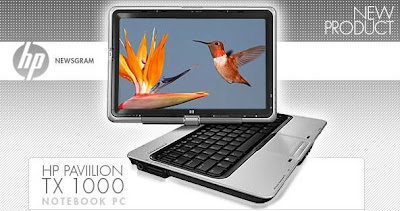
Touch Screen Laptop HP Pavilion tx1000

Touch Screen Laptop HP Pavilion tx1000
The HP Pavilion tx1000 Entertainment Notebook PC brings a new personal mobile computing experience with a ‘twist & touch’ screen display. The most innovative design enables you to enjoy the best entertainment and productivity experience. The Following features will enough to bring HP tx1000 into top level Notebook series.

• AMD Turion™ 64 X2 Dual Core Mobile technology will give maximum perfomance to multi-media applications for a more enjoyable entertainment experience. It accelerates current applications witTouch Screen Laptop HP Pavilion tx1000h HyperTransport™ Technology, for faster response and greater agility.

• Genuine Windows Vista for superior digital entertainment and advanced features

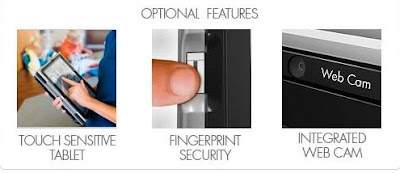
• HP BrightScreen technology. 12.1-inch touchscreen display. Enjoy bright, sharp images and crisp video clips.

• Protect your Laptop and data from unauthorize access with the built-in biometric scanner. Scan and register your fingerprint so only you may have access to the computer. Log on to email, banking or any password protected websites.

More Details Visit Here

Labels: ,

 
posted by Joby on 7:51 PM | Permalink | 0 comments
Wednesday, March 21, 2007

Top three Cheap laptops


Acer Aspire can be recommeded laptop has all the right ingredients. A good battery, a powerful processor, a DVD writer . It lacks some place that in terms of default memory as 256 MB of RAM. If you can spend out a bit extra and get that upgraded to 512MB .It may cost you around Rs.2000.

Dell Inspiron will recommeded in terms of more complete portable, stylish and proffessional level Laptop. Dell Inspiron 1300, with its 14.1" screen, 512 MB RAM and a decently powerful processor in the Pentium M 735, it's got the right mix of components and think of proffessional Dell service.

Compaq Presario V2655TS is that it's the lightest laptop compare to other acer and dell. The Compaq Presario V2655TS at thousand bucks lesser is the least expensive.


Labels: , ,

 
posted by Joby on 6:45 PM | Permalink | 0 comments
Monday, March 05, 2007

How to Secure your Home from Office.

All humans concerned about the Security issues. These days all Professional worried about home security while they working at office. If you say "YES" then follow these steps to sort out this head breaking problem. No matter where you are in the world. These are requirements to secure your home in the best way, Home Computer, LAN IP Web Camera, Internet Connection. One of the Suggested IP Camera is Genius Secure 300, this is an entry level camera and easy to install and configure.

How to Install the IP Camera into Computer.

1. You Should required Computer with Network Card.
2. LAN Wires( CAT CABLE) according to the Length From Camera to Computer.
3. IP Based Camera.
4. Power Adapter Point till the Camera.

Mount the Camera into proper Location where you get maximum view, its suggested fix the camera at least 12 to 14 Feet. All LAN Wires and Power Cables should be hide. After placing the camera you have to connect the Cable in between camera and Computer.(LAN wires two ends should be fixed with RJ 45 Connectors).

Now you have to Install the Software which will come along with Camera. Most of the Camera will configure with Common IP address, this will be default settings, according to these setting you can configure your computer LAN Card IP Address also and While installation it will ask for the Admin ID and password.

For Eg: If Camera Configure with IP:192.168.1.1 and Subnet Mask:255.255.255.0, You can use 192.168.1.2/255.255.255.0 into Computer. Once you Finish the Installation, you can see the videos in your browser. If You want to connect from outside you should have your Internet IP address. Its better to have one public IP, so that you can connect your computer to anywhere from the world.

To Access your Camera go to browser and type: http://yourstaticip. This will you into ID and password dialog box, Enter the Information to access your
Camera Views.

And Even there are Wireless IP based Cameras also into the market.
Note: Your Internet Connetion Should be alive for 24/7.

Labels: , ,

 
posted by Joby on 7:59 PM | Permalink | 0 comments
Saturday, March 03, 2007

IPOD Integrated LCD

ViewSonic's ViewDock™: The world's First Integrated LCD with IPOD Dock.
ViewSonic Lanuched With New trade mark called ViewDock™ LCD comes with Innovative Functions and beautiful piano-black, gloss finish. ViewSonic's 22" VX2245wm comes with integrated Docking station for your iPod. Enjoy the music while you browse the Internet or do your work. The big 22" screen and super-fast 5ms video give super perfomance to help you boost in your games with no blurs. And Its Integrated Subwoofer drive incredibly rich stereo sound to your desktop display. The VX2245wm sets new standards in multimedia displays with an 8-in-1 card reader,USB connection for your joystick and game control, integrated microphone and headphone jack.
LCD Panel Type 22" Wide Color TFT Active Matrix LCD
Display Area 18.7" horizontal x 11.7" vertical; 22" diagonal
Optimum Resolution 1680x1050
Contrast Ratio 700:1 (typ)
Viewing Angle 170° horizontal, 160° vertical @ contrast ratio > 10:1
Response Time 5ms (typ)
Brightness 280 cd/m2 (typ)
Light Source Long life, 40,000 hrs. (typ)
Panel Surface Anti-glare
Find More details on ViewSonic

Labels: ,

 
posted by Joby on 6:48 PM | Permalink | 0 comments
Thursday, March 01, 2007

Adobe Creative Suite: Adobe Nine Software in One Pack

Adobe Creative Suite, Today I have been placed an order for this valuable offer from Adobe Systems. Adobe® Creative Suite® 2.3 software that combines full versions of Adobe's Photoshop, Illustrator with Version Cue® CS2, Adobe Bridge, and Adobe Stock Photos.

It includes all-new Adobe Acrobat® 8 Professional software for the latest in Adobe PDF file creation, collaboration, and automated output. There Two Versions available with Creative Suite 2.3 that is Standard and Premium, Premium comes with Dreamweaver® 8, the industry-leading web development software.

Software Includes With Adobe Creative Suite.


Labels: , ,

 
posted by Joby on 7:00 PM | Permalink | 0 comments
Tuesday, January 30, 2007

Tips for Secure Browsing with Mozilla FireFox

Here Some Normal tips that you can have a safe and secure browsing with Firefox Browser.
Your browser should be always updated and it should be current version.
Whenever you do a secure transactions online, check for the "LOCK" icon which will appears in status bar and also make sure that the URL start with "https".
To make sure the safe browsing in Firefox, Go to Tools>Options>Privacy, You can clear your all information with one single click.

Adanced Tips
Change the default cookie settings
In Firefox, go to your Preferences window.
Click on the 'Privacy' icon.
Click on the 'Cookies' tab.
Here, set the following options:
Checked: Allow sites to set cookies
Checked: For the originating site only
Checked: Unless I have removed cookies set by the site
Keep Cookies: until I close Firefox.

Change the Javascript default settings
Go to your preferences page.
Click on the "Content" icon.
Next the "Enable Javascript" checkbox, click on the "Advanced..." button.
On the "Advance Javascript Settings" dialog, make sure all the options are UNchecked.
Uncheck: Move or resize existing windows
Uncheck: Raise or lower windows
Uncheck: Disable or replace context menus
Uncheck: Hide the status bar
Uncheck: Change the status bar text

Change the default Clear Private Data rules
Go the Preferences window.
Click the "Settings..." button at the bottom of the tab where it mentions the "Clear Private Data tool"
On the "Clear Private Data" Dialog, check all checkboxes except "Clean private data when closing Firefox"
Check: Browsing History
Check: Saved Form Information
Check: Download History
Check: Cookies
Check: Cache
Check: Authenticated Sessions
UNCheck: Clear private data when closing Firefox
Grayed: Ask me before clearing private data
 
posted by Joby on 7:46 PM | Permalink | 0 comments
Monday, January 29, 2007

Five Top Most Rated HDTV

5. Dell has a great cabinet design and superb speakers, but lacks a
CableCard slot, and its image quality was a bit below average.
PC World Rating: 74 (Good)
Diagonal (inches): 32
Native Resolution (pixels): 1366-by-768
CableCard Ready: No
HD Formats: 720p, 1080i
Price When Reviewed: $1449

4. Sony has Good sound quality and easy-to-understand menus.
PC World Rating: 75 (Good)
Diagonal (inches): 32
Native Resolution (pixels): 1366-by-768
CableCard Ready: Yes
HD Formats: 720p, 1080i
Price When Reviewed: $2400

3. Samsung Bright and high-quality screen, and attractively sleek,
piano-black cabinet make this TV a proud living-room centerpiece.
PC World Rating: 78 (Good)
Diagonal (inches): 32
Native Resolution (pixels): 1366-by-768
CableCard Ready: No
HD Formats: 720p, 1080i
Price When Reviewed: $1799

2. HP has Bright, high-quality screen and sleek, piano-black cabinet make this TV a proud living-room centerpiece.
PC World Rating: 78 (Good)
Diagonal (inches): 32
Native Resolution (pixels): 1366-by-768
CableCard Ready: No
HD Formats: 720p, 1080i
Price When Reviewed: $1799


1.Vizio Easy-to-understand documents and well-designed remote make this
bare-bones TV easy to use; plastic finishes look low-budget.
PC World Rating: 79 (Good)
Diagonal (inches): 32
Native Resolution (pixels): 1366-by-768
CableCard Ready: No
HD Formats: 720p, 1080i
Price When Reviewed: $1000


All Price Mentioned according to PC World.Com
 
posted by Joby on 7:24 PM | Permalink | 0 comments
Tuesday, January 23, 2007

New Asus Notebook Mobility Radeon X2300

A nice pick for Graphic Desigers !!!!!!!!!!!!!!!. Asus intoroduced a new Core@ Duo A8Jr Notebook serius which will feautre with ATI Mobility Radeon X2300 GPU.

Asus claims that its designed specifically for greater graphics performance, and Certified for Windows Vista 3D, the A8Jr will make use of ATI's HyperMemory memory management technology. Ofcourse there is an an ever-increasing demand for higher graphic processing and crisper graphics for entertainment and applications.

The new laptop will also offer something Asus is calling Splendid Video Intelligence Technology that allows the A8Jr to integrate different multimedia data sources in order to reduce noise and conversion rate for a sharper display and better contrast when running video applications.

These notebooks will all come with high-definition support capability, allowing for HD video playback on the go, as well as built-in WLAN 802.11 a/b/g, a 14.1-inch widescreen display, Bluetooth 2.0 EDR—a pumped up data rate that transmits three times faster than the standard Bluetooth—and 5 USB ports, a S-video TV-out port, and express card slots for data transfer and storage options.

These Notebooks serius expected to Ship February onwards.
 
posted by Joby on 7:49 PM | Permalink | 0 comments